

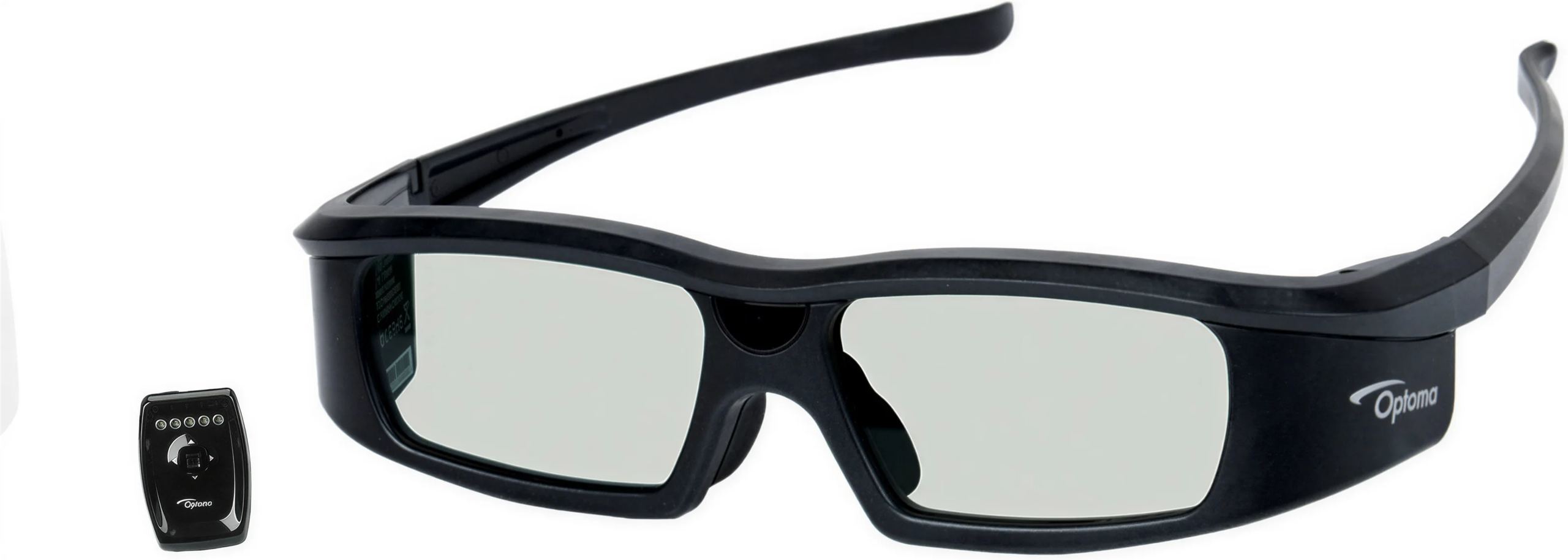
Optoma KIT RF 3D glasses + RF transmitter
Overview
On an Optoma 3D projector, the glasses synchronize by default via DLP Link, a light signal embedded in the projected image. This kit replaces that method with a radio link: a small transmitter connected to the back of the projector controls a pair of rechargeable active glasses, without them needing to see the screen. The benefits include more stable 3D depth, greater range and improved comfort during long viewing sessions.
Synchronization by radio rather than through the image
Active 3D glasses use two liquid crystal lenses that darken alternately, in time with the images intended for the left eye and then the right eye. They need a reference signal to stay synchronized with the projector. With DLP Link, this signal is a brief white flash inserted between images: the glasses must keep the screen in view, and looking away or someone walking in front can cause synchronization to drop. This flash also slightly lightens blacks.
This kit’s transmitter receives the synchronization signal directly from the projector’s VESA 3D socket and transmits it via radio frequency. Obstacles, the transmitter’s location and viewers’ positions in the room no longer affect the link, which has a range of up to 45 meters, well beyond the dimensions of a home theater room or living room.
A discreet transmitter with accessible settings
The transmitter weighs 36 g, measures 5.3 x 16 x 4.3 cm and connects to the projector using the supplied VESA 3D cable, which terminates in a round three-pin connector. It switches on automatically as soon as the projector displays 3D content. On top, a small joystick and five colored indicator lights provide access to its functions: signal quality indicator, left/right polarity reversal, manual adjustment of lens delay and opening time, pairing and factory reset.
Manual adjustment is useful in the rare cases where ghosting appears (a slight doubling of outlines). It adjusts when each lens opens and how long it stays open, with a balance to be struck: opening the lenses for less time reduces ghosting but darkens the image. With compatible Optoma projectors, the default settings are suitable in the vast majority of situations. The transmitter can also be updated from a computer, then sends the new firmware to the glasses by radio, without any additional steps.
Rechargeable glasses that go the distance
The ZF2100 glasses weigh 68 g, fold for storage and can be worn over prescription glasses, with interchangeable nose pads to adjust the fit on the nose. Their lithium-polymer battery provides 70 hours of use and recharges in 3.5 hours via USB, with a stated lifespan of 1000 charge cycles. They support frequencies from 50 to 240 Hz, covering the display rates used by 3D projectors to alternate images for the two eyes.
A button and an indicator light on the right temple control power. When switched on, the flashing pattern indicates the remaining charge: long flashes above 50%, faster flashes above 10%, and very fast flashes below that. If there is no signal from the transmitter for five minutes, the glasses switch off automatically, preventing the battery from draining if you forget to turn them off after the film.
Multiple pairs for the same viewing session
A single transmitter controls an unlimited number of ZF2100 glasses, and additional pairs are sold separately so several people can watch a film together. Out of the box, the glasses are not linked to any transmitter: they synchronize with the first active transmitter they detect, making it convenient to take them to someone’s home if they have the same system. When several transmitters operate within range, in two neighboring rooms for example, pairing links a pair to a specific transmitter, with up to eight pairs per transmitter, to prevent it from picking up the wrong projector.
Which Optoma projectors to use it with
The kit works with Optoma HD83, HD33, HD300X and GT750 projectors, and more generally with the brand’s models equipped with a VESA 3D socket. It also supports the Optoma 3D-XL converter box, which makes “3D Ready” projectors compatible with current 3D sources. Naturally, a 3D source (3D Blu-ray player, console, computer) and a projector set to 3D mode are required.
The next-generation transmitter, supplied with the ZF2300 kit, only controls ZF2300 glasses. To expand this kit, you therefore need to add ZF2100 glasses.
RF Emitter
- Synchronization technology: radio frequency
- Connection via VESA 3D port
- Range: 45 meters
- Compatible projectors
- HD83
- HD33
- HD300X
- GT750
RF 3D Glasses (ZF 2100)
- Battery life: 70 hours
- Charging time (via USB): 3.5 hours
- Battery lifespan: 1000 discharge cycles
- Compatible with frequencies from 50 Hz to 240 Hz
General Specifications
- Dimensions (W x H x D)
- Emitter: 5.3 x 16 x 4.3 cm
- Glasses: 16 x 4.3 x 5.3 cm
- Weight:
- Emitter: 36 g
- Glasses: 68 g
Frequently asked questions
What does the kit contain?
A pair of ZF2100 3D glasses, the radio transmitter, the VESA 3D cable that connects the transmitter to the projector and the USB cable for charging the glasses. This cable plugs into any USB port: computer, TV, hub or phone charger.
Can the glasses be used while charging?
Yes. The charging port is on the left temple, and the glasses continue to work when plugged in. A red indicator light stays on while charging and turns off when the battery is full.
The depth appears reversed or flat despite a sharp image, what should I do?
This is a sign that the polarity is reversed: the left eye receives the image intended for the right eye, and vice versa. To check, simply hold the glasses upside down in front of your eyes; if the 3D effect looks correct again, the polarity is the cause. This can be corrected on the source or projector if they offer this setting, or otherwise directly on the emitter using its joystick. The setting is then saved.
Can a Wi-Fi router interfere with the connection?
The radio link shares the 2.4 GHz band with Wi-Fi. The glasses compensate for interference by increasing their power consumption to stay synchronized, at the cost of reduced battery life. Placing the glasses next to a router continuously transmitting at full speed is the worst-case scenario.
Do these glasses work with a 3D TV?
They only sync with the transmitter in the ZF2100 kit. A 3D TV that uses its own synchronization system (infrared or proprietary radio) will not control them.
Why do some lights seem to flicker through the glasses?
Fluorescent lights, compact fluorescent lights and some LEDs flicker at a frequency invisible to the naked eye, but which becomes noticeable as the lenses alternate. It is best to turn off or move these light sources during projection, which is appropriate for a film screening in dim lighting anyway.
How do I clean the lenses?
With a soft cloth and a cleaning product designed for screens, free of alcohol, solvents, wax or thinners, which can mark or crack the surface. The glasses contain electronics: avoid getting them very wet, bending them or pressing hard on the lenses.
- Eco-contribution of €0.30 included in the sale price.
- GTIN / EAN: 5060059047062


