Tilting TV mounts
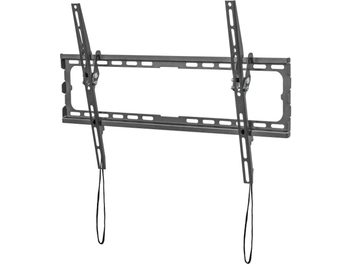
A tilting TV mount secures the television to the wall while allowing its vertical angle to be adjusted, usually from 5 to 20 degrees downward. This wall mount corrects the viewing angle of a TV mounted above eye level and reduces reflections from a window or ceiling light, without moving the screen away from the wall as an articulating mount would. Learn more
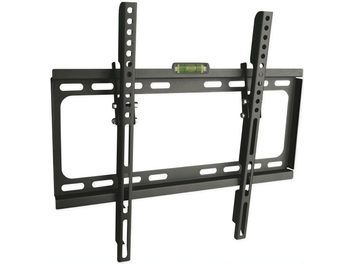
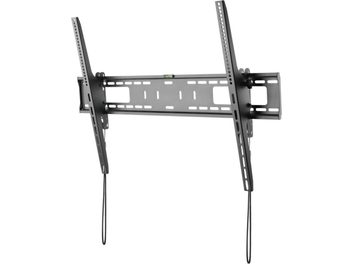
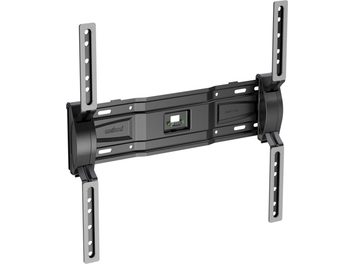
Why tilt a wall-mounted TV
A TV screen delivers its best picture when viewed straight on. When your eyes are significantly below the center of the picture, contrast drops and colors shift, especially on VA-type LCD panels, which are more sensitive to viewing angles than IPS or OLED panels. Tilting the top of the television forward brings the screen perpendicular to your line of sight: the picture regains its depth, you no longer need to tilt your head back, and viewing comfort improves over the course of a film. It is also a simple way to reduce eye strain during long evenings watching television.
The second benefit concerns reflections. A large window opposite the screen, a ceiling light or a lamp behind the sofa can all appear reflected on the panel, particularly if it has a glossy finish. A few degrees of tilt are often enough to redirect this reflection toward the floor rather than toward your eyes. The adjustment takes just a few seconds, which is useful when daylight changes from one season to the next.
Locations that call for a tilting mount
The most common guideline for comfortable viewing places the center of the picture at a seated person’s eye level, approximately one meter above the floor in a living room. As long as the TV is at this height and faces the sofa, an ultra-slim fixed wall mount is perfectly suitable. A tilting wall mount becomes useful as soon as the TV is positioned higher, which can easily happen when installing wall mounts above furniture.
Above a fireplace, a tall sideboard or a storage unit, the center of the panel often ends up 40 to 80 cm above eye level. In a bedroom, the TV is frequently mounted high up, facing the bed, and watched while lying down or propped up against pillows. In a kitchen, it is mounted high enough to keep the countertop clear. In a meeting room, restaurant or shop window, it is installed above head height so everyone can see it. In each of these cases, tilting the TV downward brings the picture back into your line of sight.
To estimate the angle needed, simply compare the height difference between the center of the picture and your eyes with the viewing distance. A picture center positioned 50 cm above eye level, viewed from 3 meters away, requires around ten degrees. At 80 cm above eye level and a distance of 2.50 meters, the angle approaches 18 degrees. Beyond 20 degrees, the TV is probably too high: it is better to reconsider the mounting height than to rely on the mount alone.
Fixed, tilting or swivel wall mounts: a comparison
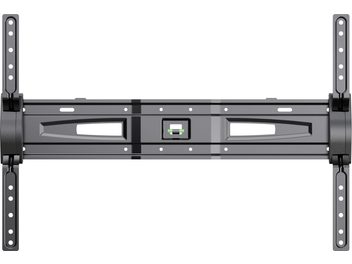
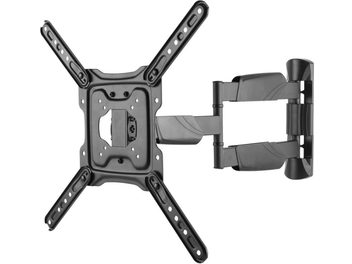
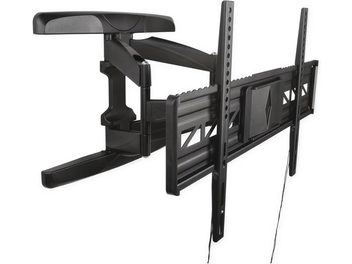
When choosing from TV wall mounts, the first point of comparison is the type of movement, with the tilting mount occupying a middle ground. A fixed wall mount is the most discreet, sitting a few centimeters from the wall, but allows no adjustment once installed. A swivel TV wall mount, also called an articulating mount, is fitted with a pivoting and often extendable arm: it moves the TV sideways and away from the wall. It is the right choice for a TV installed in a corner, watched from both a dining area and a sofa, or shared between two adjoining open rooms. The trade-off is that the arm remains visible and the TV sits several centimeters away from the wall: a swivel TV mount is only worthwhile if the TV really needs to change direction.
A tilting TV mount offers vertical adjustment only, and that is its advantage. Its structure is simple and compact, the TV stays close to the wall, and the assembly supports heavy models without a cantilevered arm. When everyone watches from the same sofa, facing the TV, sideways adjustment adds nothing. For greater flexibility, tilt-and-swivel TV mounts are available, adding a slight horizontal pivot: this type of swivel and tilting wall mount corrects a small offset without the bulk of a full arm. For a TV positioned very high up or in a public space, tilting ceiling mounts suspended from a pole take over. Finally, when no wall is suitable for drilling, a floor stand or a TV stand placed on furniture remains the alternative.
Tilt range, direction and mechanism
The range specified by each manufacturer varies according to the mount’s design. Most tilt downward only, from 5 to 15 degrees for ultra-slim mounts and up to around 20 degrees for others. Some also allow a few degrees of upward tilt, which is useful in the rare case of a TV mounted low and watched while standing.
The mechanism determines how easy wall mounts are to use day to day, far more than the stated range. On basic mounts, the TV locks into notches or is secured by a clamping screw that must be loosened before changing the angle. More refined mounts use an adjustable friction pivot: the TV can be moved with one hand and stays at the chosen angle, a feature that is easy to appreciate when making frequent adjustments. When the pivot point is close to the center of gravity, little effort is needed and the TV does not drop back down. There are also remote-controlled motorized mounts, which are less common and bulkier. In terms of finish, black dominates, while white or gray options are available for light-colored walls.
Distance from the wall and access to connections
To tilt, the TV needs a little clearance. A tilting mount generally positions it between 3 and 8 cm from the wall, compared with 2 to 3 cm for an ultra-slim fixed wall mount. The greater the tilt range, the greater this depth becomes. The bottom of the TV stays almost flush against the wall; it is the top edge that moves forward.
This clearance has a practical advantage: by tilting the television as far as possible, you can access the HDMI ports, antenna connection and power socket on the back without taking it down. This is useful for connecting a console, a Blu-ray player, a home theater amplifier or a new HDMI cable to a soundbar. The same logic applies to a network player or a set-top box added later: the less you need to dismantle, the easier it remains to use. On a very thin OLED TV with connections housed in a module at the bottom of the back, this improvement in access is less noticeable, but the thin panel does allow installation very close to the wall.
Checking that the mount is compatible with the TV
The VESA standard defines the spacing of the four threaded holes on the back of the TV, expressed in millimeters, horizontally then vertically: 200 x 200, 300 x 300, 400 x 400 or 600 x 400 mm are common values. The mount must be compatible with this hole spacing, often stated as a maximum VESA size. It appears in the TV’s manual and specifications, and is easy to measure with a tape measure, from the center of one hole to the center of another.
The maximum load specified by the manufacturer matters more than the size range expressed in inches or by diagonal measurement. Two 65-inch TVs can have very different weights depending on their technology and built-in electronics. It is sensible to leave a margin of at least 20 to 30% between the TV’s weight and the mount’s limit, especially since tilting shifts the center of gravity forward and increases the pull-out force on the upper screws. If a soundbar or speakers are to be attached below the screen using an adapter accessory, their weight must be added, and the adapter must be compatible with the mount.
Other details deserve a look: a curved back, a socket positioned right next to the holes or a curved panel require the supplied spacers, which hold the rails away from the back of the TV. The thinnest OLED TVs, whose upper section contains only the panel, sometimes have mounting points positioned low down: the mount must then allow an offset installation.
Installing and securing a TV wall mount
The wall material determines the choice of wall anchors and, sometimes, the mount itself. A concrete or solid brick wall can support heavy loads with standard wall anchors. Hollow concrete blocks or hollow bricks require anchors suitable for hollow materials, or even chemical anchors for a large TV. On a plasterboard partition, you need to aim for the metal or wooden studs in the frame, or use specific expansion anchors while remaining cautious about weight. If in doubt, advice from a professional remains the best safeguard.
Installation takes place in two stages. The wall plate is installed first, perfectly level using the spirit level often supplied, then the rails are screwed onto the back of the TV, laid flat with the screen facing a soft surface. The TV is then hooked onto the plate, with two people needed for screens larger than 40 inches. A locking system, safety screw or clip prevents the TV from becoming unhooked if knocked upward: this must never be forgotten, especially in a child’s bedroom or a busy passageway.
To position the plate correctly, measure the height at which the center of the picture should sit, then the distance between that center and the holes in the plate once it is clipped onto the TV. Also plan the cable route: cable trunking painted to match the wall or a recessed cable pass-through behind the TV provides a tidy result, and leave enough cable length so that tilting does not pull the cables taut.