Krovatar KBU-300


Specifications and features


Krovatar KBU-300, 4K Ultra HD Blu-ray player
Ultra HD disc players are becoming scarce on store shelves, even though a 4K Blu-ray remains the highest-bitrate source you can connect to a TV or a projector. Krovatar, a young brand based in Shenzhen, launches its 4K range with this compact model, which plays Blu-rays, DVDs, CDs and SACDs, recognizes the main HDR formats and sends picture and sound through two separate HDMI outputs.
A Panasonic drive controlled by the MediaTek MT8581 chip
Playback relies on a Panasonic optical drive, chosen for its quiet operation: you cannot hear it spinning during quiet passages in a film, which matters when the player is placed near the sofa. It reads triple-layer 100 GB Ultra HD discs, the format’s highest-density discs, as well as standard Blu-rays, 3D Blu-rays and DVDs.
Processing is handled by the MediaTek MT8581 processor, a chip proven in home 4K players. It decodes Ultra HD video and converts high-definition Blu-rays and DVDs to the screen’s 4K resolution (known as scaling, or upscaling). A collection of older discs therefore benefits from the 4K TV without relying on its own conversion circuitry. Interactive Blu-ray menus, programmed in Java (BD-J), work normally, including bonus features and chapter selection.
Dolby Vision, HDR10+ and HDR10 on the same player
HDR widens the gap between the darkest and brightest areas of the picture. HDR10, the base format, sets these parameters once for the entire film. Dolby Vision and HDR10+ adjust brightness scene by scene using dynamic information recorded on the disc, preventing a nighttime sequence from being calibrated for the explosion in the next chapter. The KBU-300 transmits all three formats: the TV or projector determines which one is displayed, depending on what it supports. Some TVs handle only one of the two dynamic formats, and the player adapts to both the disc and the screen.
Two HDMI outputs to separate picture and sound
The HDMI OUT 1 output carries picture and sound to the TV or projector. The HDMI OUT 2 output transmits audio only and connects to a home theater amplifier. This separation solves a common problem: an older amplifier that cannot pass through 4K HDR video can remain in the system and continue decoding sound, while the picture goes directly to the screen.
Dolby Atmos and DTS:X tracks, along with the Dolby TrueHD and DTS-HD formats that carry them, are sent unchanged to the amplifier, which handles decoding. The coaxial digital output takes over for an amplifier or converter without an HDMI input, with a limitation inherent to this connection: it carries stereo sound and standard Dolby Digital or DTS in 5.1, but not Atmos tracks or high-resolution Blu-ray disc audio. The player has no analog output. It therefore always connects to a digital device, whether an amplifier, soundbar or converter.
SACD, CD and high-resolution music files
The KBU-300 plays the stereo layer of SACDs in native DSD, the original encoding format of these discs, without prior conversion. This DSD stream is output via HDMI, the only connection capable of carrying it, to a compatible amplifier. Standard audio CDs are played using the same drive.
The player also serves as a source for digital music and videos stored on a hard drive. Lossless audio files can be played from an NTFS-formatted USB flash drive or USB drive, or from a computer or server on the local network via DLNA, connected through the Ethernet port. MKV, M2TS, TS and MP4 video files are supported up to 4K HDR. The rear USB 3.0 port accommodates a permanently connected hard drive, while the front port remains available for occasionally connecting a flash drive.
Bluetooth headphones connected wirelessly to the player
A Qualcomm module transmits sound over Bluetooth using the aptX HD codec, which delivers greater detail than the standard SBC codec. The KBU-300 connects to headphones for watching a film late at night without waking the household, or to an active speaker when the system has no amplifier. The supplied remote control also uses Bluetooth: it does not need to be pointed at the front panel and controls the player even when it is stored in a closed cabinet.
A 32 cm chassis and an external power supply
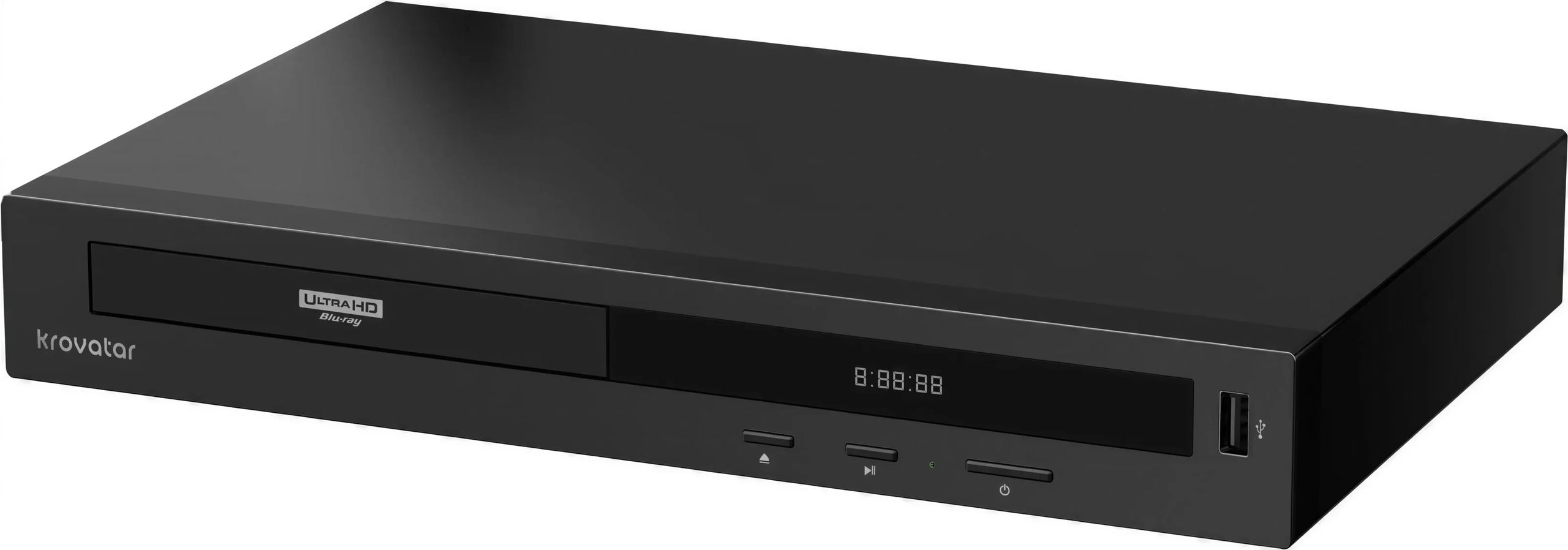
Measuring 320 × 204 × 51.5 mm, the KBU-300 fits on a shelf in an ordinary TV cabinet. The black front panel combines a digital display and three buttons (eject, play and pause, power and standby), sufficient for everyday operations without searching for the remote control. The power supply is an external 12 V unit: the transformer stays outside the enclosure, which explains the chassis’s low height. Power consumption reaches 18 W during playback.
Documentation
Technical specifications
Overview and design
- Device type: 4K Ultra HD Blu-ray player
- Positioning: entry-level model in the Krovatar 4K range, below the KBU-500
- Disc mechanism: quiet Panasonic optical assembly
- Processor: MediaTek MT8581
- Display: front-panel digital display
- Front-panel controls: eject, play / pause, power / standby
- Blu-ray interactivity: BD-J (Java)
- Laser class: class 1
- Finish: black
Compatible discs and formats
- Video discs: 4K Ultra HD Blu-ray, Blu-ray (2K), Blu-ray 3D, DVD-Video
- Audio discs: SACD (2 channels)
- HDR formats: HDR10, HDR10+, Dolby Vision
- Audio formats: Dolby Atmos, DTS:X
Connectivity and communications
- HDMI outputs:
- 1 main output (HDMI OUT 1) for audio and video
- 1 audio-only output (HDMI OUT 2), for a home theater amplifier
- Digital audio output: 1 coaxial output
- USB ports:
- 1 USB 3.0 port on the rear
- 1 front-panel USB port
- Network: 1 Ethernet port (LAN)
- Bluetooth: yes, Qualcomm module
Power supply and consumption
- Power supply: 12 V / 1.5 A DC input, with external power supply
- Power consumption: 18 W
Dimensions
- Dimensions (W × D × H): 320 × 204 × 51.5 mm
Frequently Asked Questions
Can DVDs purchased abroad be played?
Yes, DVDs are region-free: an American or Japanese edition plays just like a DVD purchased in France. For Ultra HD Blu-rays, the question rarely arises, as the vast majority of 4K editions have no region code.
Do you need a 4K TV to enjoy the KBU-300?
No. When connected to a Full HD TV, the player outputs a 1080p image and plays Ultra HD discs at this resolution. However, the format’s full benefits are experienced on an HDR-compatible 4K screen, where the disc’s resolution and brightness range are reproduced in full.
Which HDMI cable should I use for 4K HDR?
A Premium High Speed certified cable (18 Gbit/s) is sufficient for the 4K HDR video at 60 frames per second delivered by Ultra HD Blu-ray discs. Beyond a few metres, a certified cable prevents picture dropouts or intermittent black screens that often indicate a cable that is barely up to the task.
Do 3D Blu-rays work with all TVs?
They require a 3D-compatible TV or projector, along with its glasses. Recent TVs have dropped this feature, while many home theater projectors still offer it. On a non-compatible screen, the player displays the 2D version included on most discs.
How do you play hybrid SACDs?
A hybrid SACD contains an SACD layer and a CD layer. The KBU-300 plays the stereo SACD layer in DSD through an amplifier that accepts this format via HDMI. With an amplifier connected via coaxial, you hear the CD layer, keeping the disc playable throughout the system.
Can music stored on a NAS be played?
Yes, via the DLNA protocol, provided that the NAS acts as a media server (this feature is available on most models). The player connects to the home network via an Ethernet cable, a stable connection suitable for large video files.
Is the KBU-300 suitable for a projector placed far from the amplifier?
Yes, that’s the typical use of dual HDMI outputs: HDMI OUT 1 goes to the ceiling-mounted projector, while HDMI OUT 2 connects to the amplifier in the cabinet. This avoids routing 4K video through the amplifier, and only one long HDMI cable is needed—the one leading to the projector.
- Eco-contribution included in the sale price.
- GTIN / EAN: 6979082070024