Each year, dozens of European journalists gather to select the best electronic products of the year. Awarded by a diverse and impartial jury, the EISA (Expert Imaging and Sound Association) awards recognize exceptional products for their performance, design, or ergonomics.
Overview
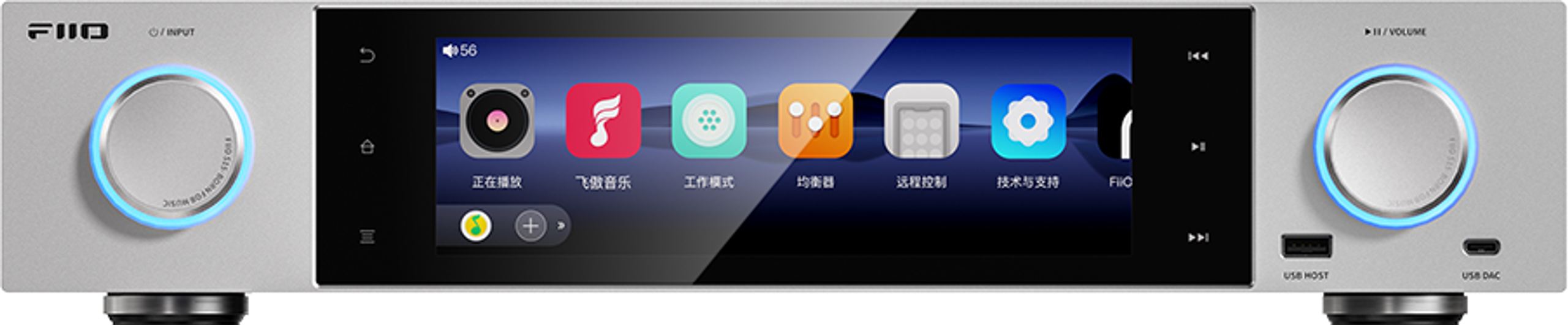
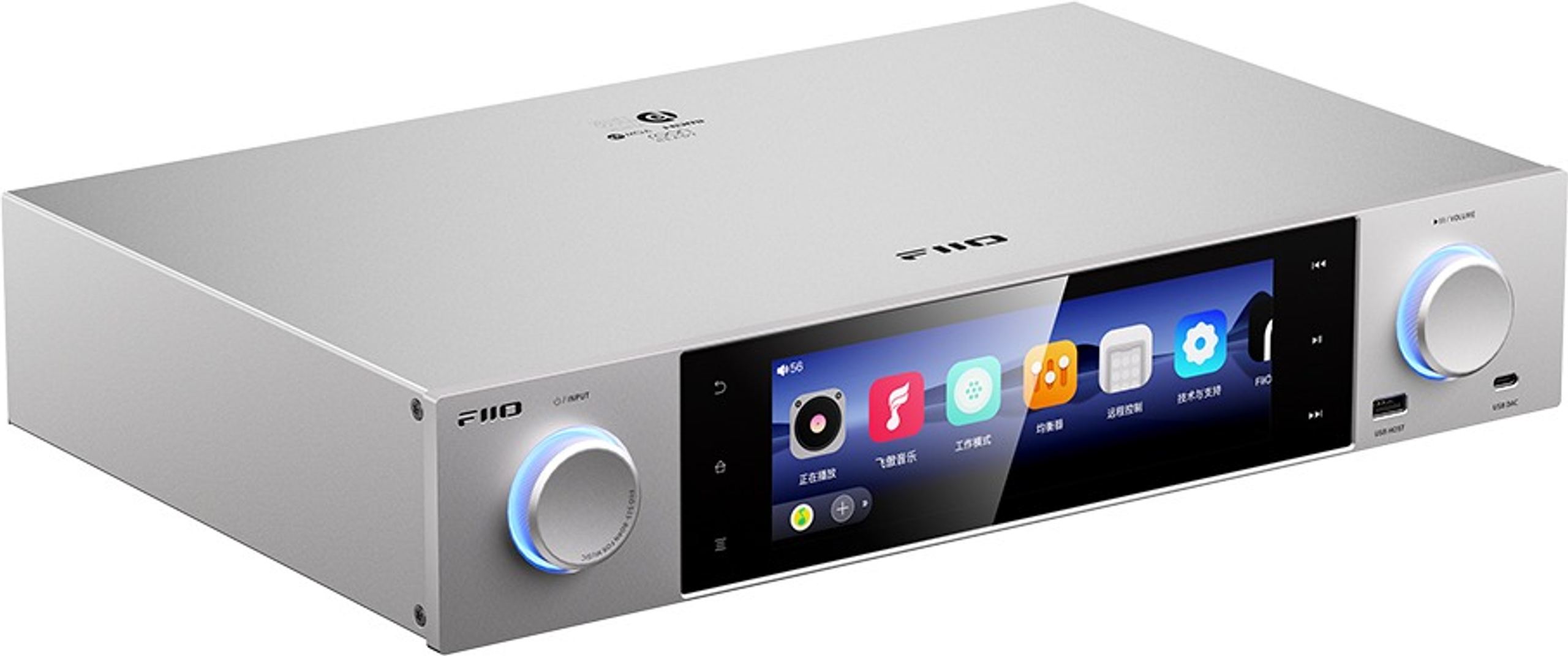
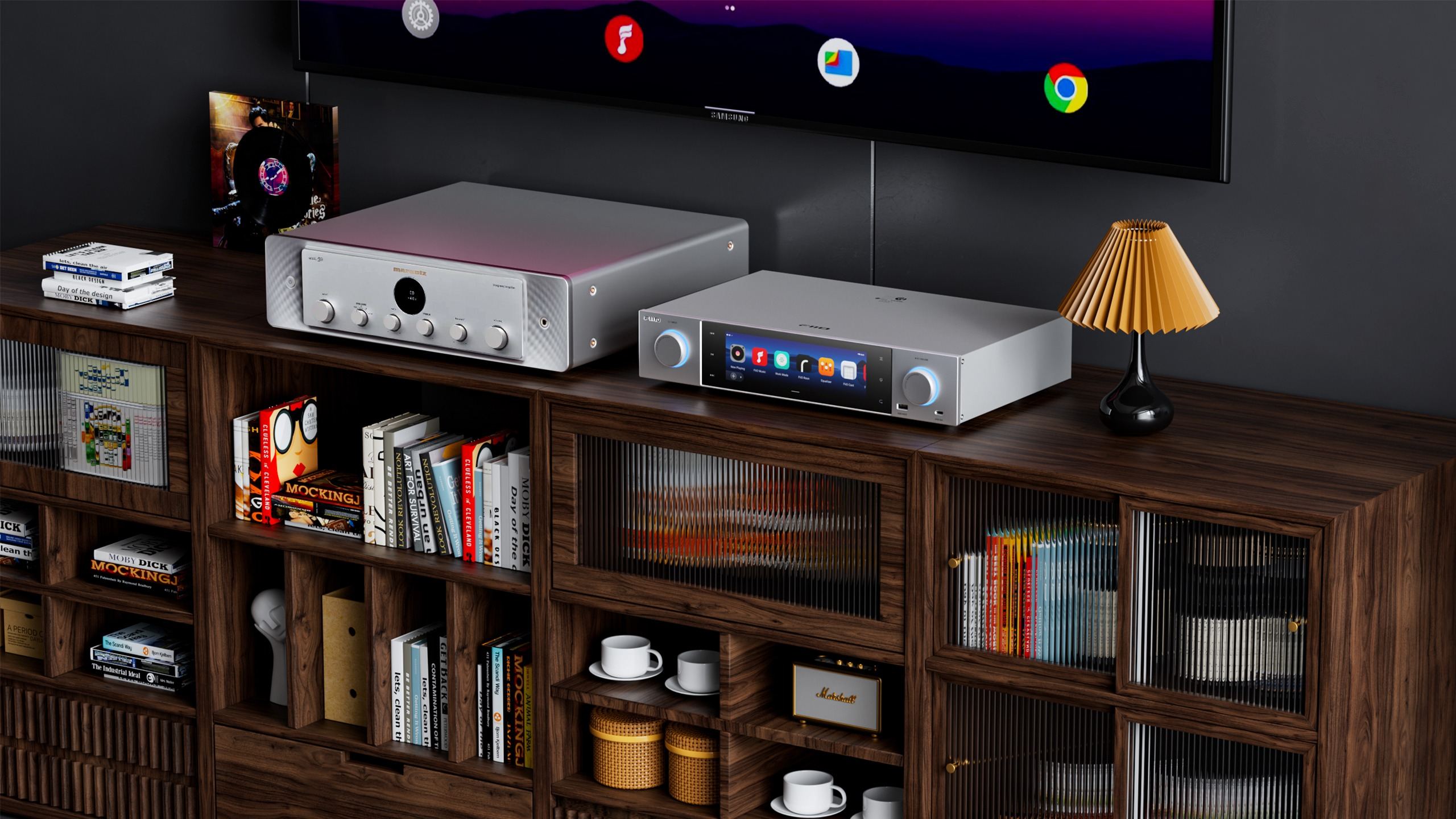
The FiiO S15 marks the brand’s spectacular entry into the traditional hi-fi network player segment. Following the success of the R7 and R9 desktop models, FiiO introduces the S15, a device that combines streamer, high-resolution DAC, and preamplifier functions in an elegant 430 mm chassis. Its 7.84-inch touchscreen and native Android 12 system redefine the approach to audio streaming, while its audiophile-grade components and extensive connectivity—including an HDMI ARC input—position it as a serious contender against established market references.
Next-Generation Interface and Refined Design
The S15 immediately stands out with its large 7.84-inch color touchscreen, an impressive size in this price range that greatly facilitates navigation and content access. This automotive-grade display features a fully customized Android 12 interface by FiiO, allowing intuitive control and direct access to streaming apps without the need for a smartphone or tablet.
The all-metal chassis with a sleek design rests on anti-slip feet that effectively isolate the device from unwanted vibrations. This meticulous design reflects attention to every detail, from aesthetics to acoustic performance. The interface can display album covers, file resolution information, or even vintage needle VU meters for a striking visual effect during playback.
Reference Audio Architecture
At its core, the S15 reveals a true audiophile approach with its pair of AKM DAC chips: the AK4499EX converter paired with the AK4191EQ modulator. This architecture physically separates digital and analog processing, minimizing interference and optimizing the signal-to-noise ratio for exceptionally precise sound reproduction. The 16-core XMOS V16AOPP controller handles high-resolution streams up to PCM 32-bit / 768 kHz and DSD512.
The ultra-low-noise 35 W linear power supply is another major asset, coupled with four 4700 μF ELNA capacitors that ensure a stable energy reserve. This design avoids the disturbances typical of switching power supplies and guarantees preserved dynamics. The dual ACCUSILICON AS318-B femtosecond clocks reduce jitter to an almost nonexistent level, ensuring perfect timing of audio data.
Uncompromising Connectivity
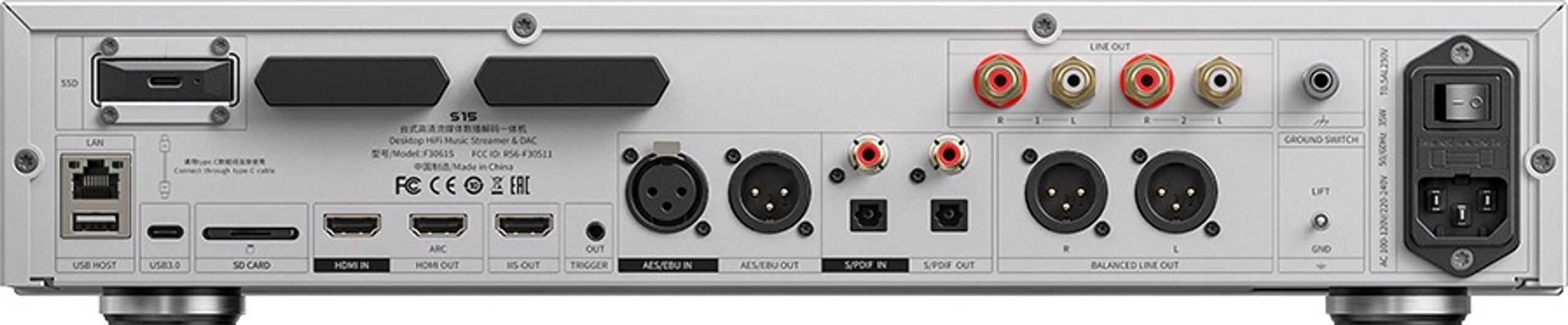
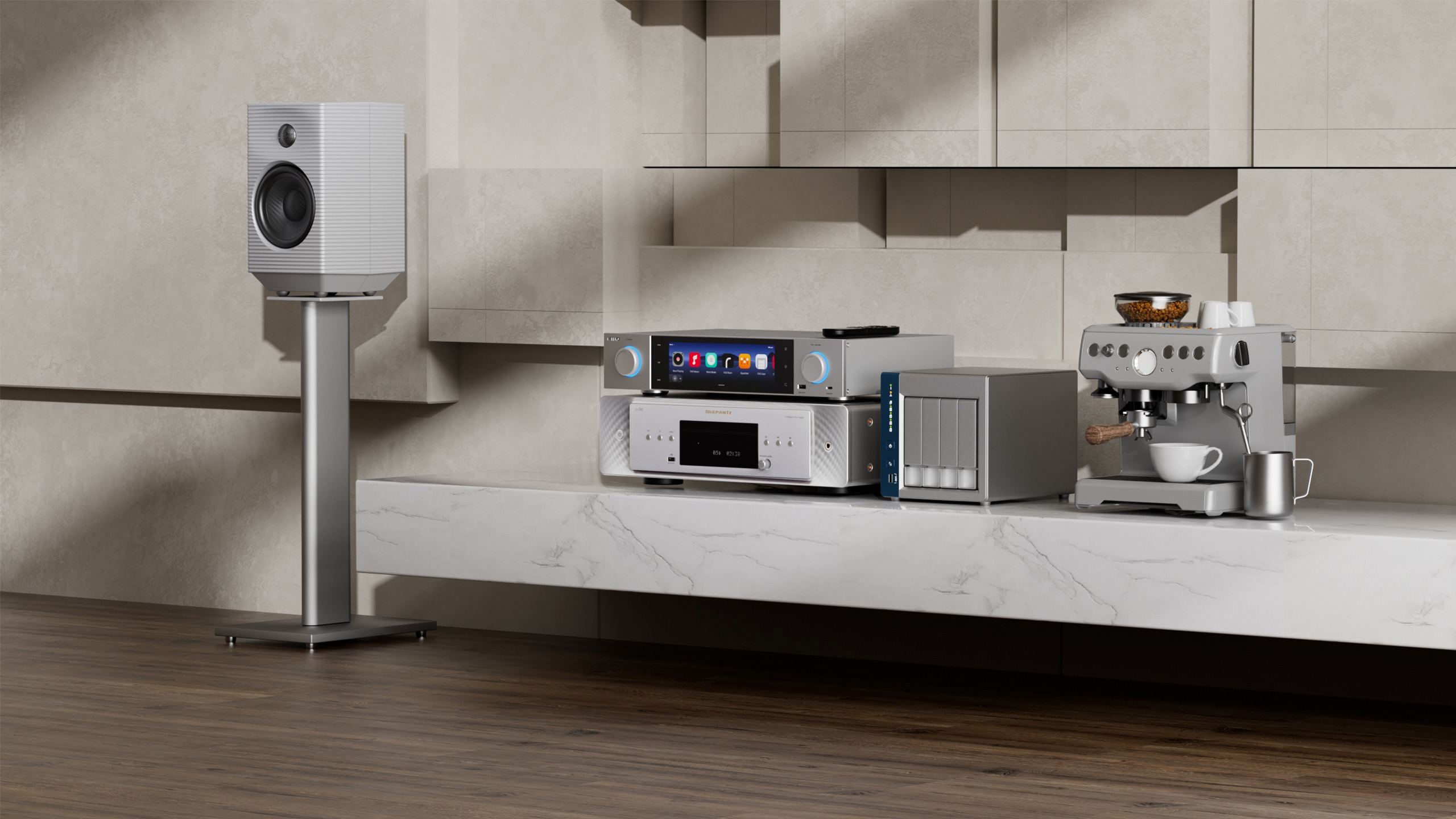
The S15’s connectivity is impressively versatile. On the input side, there are two HDMI ports, including one HDMI ARC for direct TV connection, as well as traditional digital connections: optical, coaxial, and AES/EBU. This setup allows you to use the internal DAC to enhance any digital source, from CD players to TV set-top boxes.
Analog RCA and XLR outputs allow direct connection to a power amplifier, turning the S15 into the central preamplifier of your system. Digital outputs (optical, coaxial, AES/EBU, and HDMI i2S) also let you route conversion to an external DAC if desired. A trigger output automates cascading power-up of other system components.
Universal Streaming and Integrated Services
The optimized Android 12 system provides access to all current audio streaming platforms: Qobuz, Tidal, Amazon Music, Spotify, Deezer, and many more. Installation is done directly from the Google Play Store, offering total flexibility to suit everyone’s musical preferences. DLNA, UPnP, and Roon Ready protocols ensure compatibility with existing music servers.
The Bluetooth 5.1 module with Qualcomm QCC5125 chip supports high-definition LDAC and aptX Adaptive codecs. Its bidirectional functionality allows you to receive music from a smartphone, but also stream to wireless headphones or speakers, adding a highly practical dimension. AirPlay completes the wireless reception options for Apple device users.
Music Library and Local Storage
The S15 features an internal M.2 SSD slot, allowing you to store up to several terabytes of music directly on the device. This solution eliminates dependence on the network to access your personal library. An SD card reader completes the local storage options, while the two USB-A ports accept USB drives and external hard drives.
FiiO’s exclusive DAPS (Digital Audio Purification System) optimizes PCM and DSD signal processing without unwanted resampling, preserving the integrity of the original audio data. This approach ensures faithful reproduction of the artist’s intent, whether from local files or streaming sources.
Central Hub of the Audio-Video System
The S15’s preamplifier function makes it a true audio-video control center. Multiple inputs allow you to centralize all sources: CD player via digital inputs, computer via USB-C, TV via HDMI ARC, and of course all network and local sources. Volume control is handled directly from the touchscreen or the dedicated mobile app.
This centralization greatly simplifies daily use by avoiding multiple remotes and offering a unified interface for all sources. The trigger output automates amplifier power-up, creating a perfectly integrated and user-friendly system.
Everyday Control and Ergonomics
The large touchscreen transforms interaction with the device, allowing intuitive navigation through music libraries and settings. The customized Android interface remains smooth thanks to the Snapdragon 660 processor, avoiding the slowdowns often seen on other streamers. The FiiO Control mobile app offers an alternative for control via smartphone or tablet.
The included Bluetooth remote features advanced gesture functions, adding a tactile dimension to remote control. This multimodal approach (touchscreen, mobile app, remote) adapts to all usage scenarios and interaction preferences.
What the press says
Comprehensive and audiophile-grade, the Fiio S15 streamer makes a strong impression with its meticulous design at every level. While not perfect, this device offers a great deal for a reasonable price.
Automatically translated — Show original (French)
Complet et audiophile, le streamer Fiio S15 marque les esprits par sa conception extrêmement soignée à tous les niveaux. Un appareil qui n’est certes pas parfait, mais qui en propose énormément pour un tarif contenu.
Can the S15 fully replace a traditional preamplifier?
+
Absolutely. With its multiple inputs (analog and digital), precise volume control, and RCA/XLR outputs, the S15 centralizes all the functions of a modern preamplifier while adding streaming and high-resolution digital conversion capabilities.
Does using Android 12 affect the device’s stability?
+
FiiO has optimized Android specifically for audio, with a dedicated interface and streamlined processes. The system is remarkably stable for audio use, benefiting from Android’s maturity while avoiding non-essential apps that could disrupt playback.
How does the S15 compare to Bluesound or WiiM streamers?
+
The S15 targets a more technically demanding audience with its audiophile DAC and linear power supply. Unlike multiroom-oriented solutions, it prioritizes pure audio quality and traditional hi-fi integration, while retaining the ease of use of modern streamers.
Is the bidirectional Bluetooth feature really justified?
+
The bidirectional function adds remarkable versatility: receive music from a smartphone on the go, but also stream to headphones for nighttime listening without disturbing others. The HD codecs (LDAC, aptX) maintain high quality in both directions.
User reviews
Panagiotis
Fiio s15 has very good sound. The quality of the equipment is in a very high. The only difficulty I found was to connect with my phone. The problem is a QR code, it was very difficult to recognized by the phone. So I make photo put on the PC and open it on the screen, after that everything was OK. I believe that is the best streamer for that money even and for double price.
Comment from March 04, 2026
Zdenko
As always with FiiO, the hardware is top-notch, the software can’t quite keep up. The sound is very, very good for streaming. I listen to Qobuz and Amazon Music with a JDS Element amp and Moondrop Para 2 on the FiiO S15 and I’m thrilled with the sound. The FiiO Music Player together with a connected 2 TB M.2 NVMe filled with my music collection in FLAC 24-bit/96 kHz is also on a high level. Unfortunately, you can’t use the EQ in some operating modes (DAC and PureAudio). FiiO will probably improve this in upcoming updates (I’m currently on version 1.04). There are plenty of digital and analog IN / OUT connections. The build quality is very good for this price. I can recommend FiiO, but only for people with good knowledge of audio devices and strong nerves; otherwise everyday frustration is pre-programmed. But if you want to enjoy very good sound at a still affordable price, it’s worth it.
Comment from November 24, 2025 — Experience from November 13, 2025
Automatically translated — Show original (German)
Wie immer bei Fiio,Hardware top,Software kann nicht gut mithalten.
Der Klang ist sehr,sehr gut bei Streaming.
Ich höre Qobuz und Amazon Music mit JDS Element Amp und Moondrop Para 2 auf Fiio S15 und bin von Klang begeistert.
Auch von Fiio Music Player und angeschlossener 2TB M2 Nvme befüllt mit meine Musik-Samlung in Flac 24bit/96 kHz,ist am hochem Nivou.
Leider kann man nicht EQ in manche Arbeit-Einstellungen nutzen(DAC und PureAudio).
Fiio wird es in kommenden Updates wahrscheinlich nachbessern(bei mir ist letzte1.04).
Es sind reichlich an digitale und analoge IN /OUT Anschlüsse.
Verarbeitung ist sehr gut für dieses Preis.
Fiio kann ich weiter empfehlen nur für Leute mit guten Kentnisse von Audio Gerãte und starke Nerven,sonnst ist Ãrger im Alltag vorprogramiert,aber sehr guter Klang geniesen wollen für ein noch bezahlbarem Preis.
Giovanni
The FiiO S15 is a good product, but not easy to understand how it works; for this reason, I have prepared a fairly analytical guide related to the procedure to follow. Of course, it’s not exhaustive, but it includes the fundamental elements that will make usage easier. I advise against using the internal SSD case—connect it externally, optionally fixed on the top with some Blu-Tack. With that premise, the procedure is as follows: Initial setup FiiO S15 + RM3 pairing 1. Preparation Set the rear selector to 220V (Italy only) Connect power to a filtered outlet Insert any USB, micro SD, SSD. It is recommended to use an external SSD. 2. First power-on Press the front button and wait for boot Select language, time zone, Wi‑Fi (recommended) 3. Recommended settings System: firmware update, date/time, theme Audio: Headphone Out output (recommended), gain, DAC filter, DSD mode 4. Operating modes Android Mode: full apps Pure Music Mode: FiiO Music only USB DAC Mode: DAC for PC/Mac → Mode selectable via BDA switch under the chassis 5. Bluetooth Settings → Bluetooth → Enable Wait for the device list 6. RM3 pairing Insert batteries → hold the power button until the LED flashes On the S15: press “Pair” → select RM3 → check the box Enter details (gear icon) → check again 7. Use in Pure Music Manually access the Bluetooth screen After pairing, active functions: volume, play/pause, navigation Final notes RM3 supports Bluetooth and IR Make sure the S15’s IR sensor is unobstructed Bluetooth pairing remains active after reboot. It is recommended to use the FiiO Music app and optionally a BT keyboard.
Comment from November 06, 2025 — Experience from October 26, 2025
Automatically translated — Show original (Italian)
Il Fiio S15 è un buon prodotto, ma non facile da capire il funzionamento, per questa ragione ho predisposto una guida abbastanza analitica relativa alla procedura: da segure. Naturalmente non è esaustiva ma comprende gli elementi fondamentali che faciliteranno l'utilizzo. Sconsiglio di utilizzare il case SSD all'interno, collegatelo esternamente, eventualmente fissato sulla parte superiore con del Blu-Tack. Fatta questa premessa, la procedura è la seguente:
Configurazione iniziale FiiO S15 + Accoppiamento RM3
1. Preparazione
Impostare il selettore posteriore su 220V (solo per l'Italia)
Collegare alimentazione a presa filtrata
Inserire eventuali USB, micro SD, SSD. Si consiglia di utilizzare un SSD esterna.
2. Prima accensione
Premere il tasto frontale e attendere il boot
Selezionare lingua, fuso orario, Wi-Fi (consigliato)
3. Impostazioni consigliate
Sistema: aggiornamento firmware, data/ora, tema
Audio: uscita Headphone Out (consigliata), gain, filtro DAC, DSD mode
4. Modalità operative
Android Mode: app complete
Pure Music Mode: solo FiiO Music
USB DAC Mode: DAC per PC/Mac
→ Modalità selezionabile via BDA switch sotto il telaio
5. Bluetooth
Impostazioni → Bluetooth → Attiva
Attendere la lista dispositivi
6. Accoppiamento RM3
Inserire batterie → tenere premuto tasto accensione finché il LED lampeggia
Sul S15: premere “Accoppia” → selezionare RM3 → spuntare
Entrare nel dettaglio (rondella) → spuntare di nuovo
7. Uso in Pure Music
Accedere manualmente alla schermata Bluetooth
Dopo l’accoppiamento, funzioni attive: volume, play/pause, navigazione
Note finali
RM3 supporta Bluetooth e IR
Verificare che il sensore IR del S15 sia libero
L’accoppiamento Bluetooth resta attivo dopo riavvio.
Si consiglia di utilizzare l'appFiio Music ed eventualmente una tastiera Bt.
To better understand our visitors, measure marketing effectiveness and personalise ads, we and our partners use cookies and mobile advertising identifiers on your device. This data makes it possible to display personalised and non-personalised ads and measure their performance. Some cookies, which are technically necessary, are exempt from consent. You can accept those that require your consent, refuse them by clicking "Refuse", or customise your choices via the settings screen.
To find out how Google uses the data collected once you have given your consent, see Google’s Business Data Responsibility site (opens in a new window).
You can change or withdraw your consent at any time via the "Consent and cookies" link. Your choices will apply on our site for 12 months.